本文介绍如何为 Waline 配置评论邮件通知,涵盖 SMTP 设置、环境变量配置与自定义邮件模板。以 Vercel 部署为例,其他平台可对照 Waline 官方文档 🌊 操作。
部署 Waline#
按官方文档完成 Waline 部署即可:
获取 SMTP 授权码#
Waline 通过 SMTP 发送邮件,需使用授权码而非邮箱登录密码。建议使用专门用于发信的邮箱。
以 163 邮箱为例:登录网页版 → 设置 → POP3/SMTP/IMAP → 开启 POP3/SMTP 与 IMAP/SMTP 服务 → 获取并保存授权码(后续填入 SMTP_PASS)。
配置环境变量#
- 打开 Vercel Dashboard 🌊,进入你的 Waline 项目。
- 进入 Settings → Environment Variables。
- 点击 Add New,依次配置以下环境变量:
| 环境变量 | 说明 | 举例 |
|---|---|---|
SMTP_SERVICE | SMTP 服务提供商;邮箱支持列表 🌊 | 163 |
SMTP_HOST | SMTP 服务器地址,可在邮箱设置中查看。 | smtp.163.com |
SMTP_PORT | SMTP 端口。 | 465 |
SMTP_USER | SMTP 邮件发送服务的用户名,一般为登录邮箱。 | yourname@163.com |
SMTP_PASS | SMTP 密码;163 邮箱须填 SMTP 授权码(见上文),不能填登录密码。 | 上一步获取的授权码 |
SMTP_SECURE | 是否使用 SSL。 | true |
SITE_NAME | 网站名称,会在邮件中展示。 | Saneko |
SITE_URL | 网站地址。 | https://你的域名 |
AUTHOR_EMAIL | 博主邮箱,用于接收新评论通知(博主自己的评论不通知)。 | yourname@163.com |
SENDER_NAME | 自定义发件人名称。 | Saneko |
SENDER_EMAIL | 自定义发件地址,通常与 SMTP_USER 一致。 | yourname@163.com |
- 保存所有变量后,在项目中选择 Redeploy 重新部署,使环境变量生效。
自定义邮件模板#
以下模板支持亮色/暗色自适应,可按需修改样式后填入对应环境变量。
新评论通知(发给博主)#
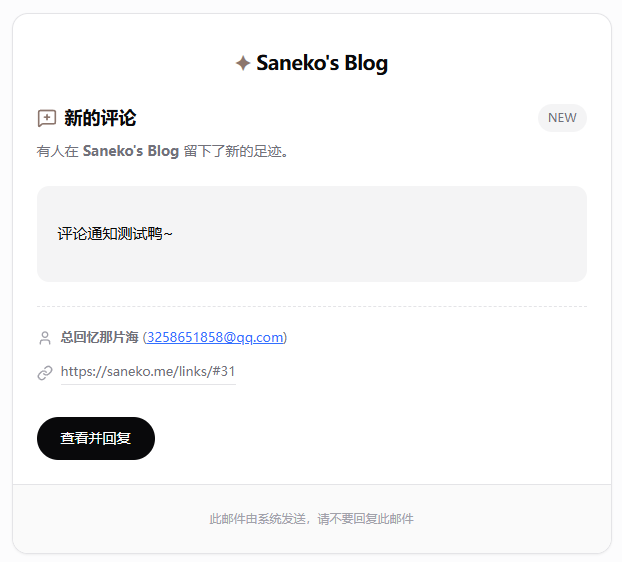
在环境变量中添加 MAIL_TEMPLATE,值为下方 HTML(整段复制,保留为单段即可)。
<div style="margin: 0; padding: 40px 0; background-color: #fcfcfd; color: #09090b; font-family: Satoshi, ui-sans-serif, system-ui, -apple-system, BlinkMacSystemFont, 'Segoe UI', Roboto, 'Helvetica Neue', Arial, sans-serif;">
    <style>
        /* Dark mode support */
        @media (prefers-color-scheme: dark) {
            .email-body { background-color: #0B0B10 !important; color: #f4f4f5 !important; }
            .card { background-color: #18181b !important; border-color: #27272a !important; }
            .text-muted { color: #a1a1aa !important; }
            .bg-muted { background-color: #27272a !important; }
            .text-primary { color: #8C766D !important; }
        }
    </style>

    <!-- Main Container -->
    <div class="email-body" style="max-width: 600px; margin: 0 auto; padding: 0 20px;">

        <!-- Card -->
        <div class="card" style="background-color: #ffffff; border: 1px solid #e4e4e7; border-radius: 16px; overflow: hidden; box-shadow: 0 1px 2px 0 rgba(0, 0, 0, 0.05);">

            <!-- Brand Header Inside Card -->
            <div style="text-align: center; padding: 32px 0 0 0;">
                <a href="{{site.url}}" style="text-decoration: none; color: #09090b; font-weight: 600; font-size: 20px; letter-spacing: -0.5px;">
                    <span style="color: #8C766D;">✦</span> {{site.name}}
                </a>
            </div>

            <!-- Header -->
            <div style="padding: 24px 24px 0 24px;">
                <div style="display: flex; align-items: center; justify-content: space-between; margin-bottom: 8px;">
                    <h1 style="margin: 0; font-size: 18px; font-weight: 600; color: #09090b; display: flex; align-items: center; gap: 8px;">
                        <!-- MessageSquarePlus Icon -->
                        <img src="https://api.iconify.design/lucide:message-square-plus.svg?color=%238C766D" width="20" height="20" style="vertical-align: text-bottom;" alt="">
                        <span>新的评论</span>
                    </h1>
                    <span style="font-size: 12px; font-weight: 500; background-color: #f4f4f5; color: #71717a; padding: 4px 10px; border-radius: 9999px;">NEW</span>
                </div>
                <p class="text-muted" style="margin: 0; font-size: 14px; color: #71717a; line-height: 1.5;">
                    有人在 <strong>{{site.name}}</strong> 留下了新的足迹。
                </p>
            </div>

            <!-- Content -->
            <div style="padding: 24px;">

                <!-- Comment Block -->
                <div class="bg-muted" style="background-color: #f4f4f5; border-radius: 12px; padding: 20px; margin-bottom: 24px; border: 1px solid transparent;">
                    <div style="font-size: 15px; color: #09090b; line-height: 1.6;">
                        {{self.comment | safe}}
                    </div>
                </div>

                <!-- Meta Info -->
                <div style="display: flex; flex-direction: column; gap: 12px; font-size: 13px; color: #71717a; border-top: 1px dashed #e4e4e7; padding-top: 20px;">
                    <div style="display: flex; align-items: center; gap: 8px;">
                        <img src="https://api.iconify.design/lucide:user.svg?color=%23a1a1aa" width="16" height="16" alt="">
                        <span><strong>{{self.nick}}</strong> ({{self.mail}})</span>
                    </div>
                    <div style="display: flex; align-items: center; gap: 8px;">
                        <img src="https://api.iconify.design/lucide:link.svg?color=%23a1a1aa" width="16" height="16" alt="">
                        <a href="{{site.postUrl}}" style="color: #71717a; text-decoration: none; border-bottom: 1px solid #e4e4e7; padding-bottom: 1px;">{{site.postUrl}}</a>
                    </div>
                </div>

                <!-- Action Button -->
                <div style="margin-top: 32px;">
                    <a href="{{site.postUrl}}" style="display: inline-block; background-color: #09090b; color: #ffffff; text-decoration: none; padding: 10px 24px; border-radius: 9999px; font-size: 14px; font-weight: 500; transition: opacity 0.2s;">
                        查看并回复
                    </a>
                </div>

            </div>

            <!-- Footer in Card -->
            <div class="bg-muted" style="background-color: #fafafa; border-top: 1px solid #e4e4e7; padding: 24px; font-size: 12px; color: #a1a1aa; text-align: center;">
                <p style="margin: 0;">此邮件由系统发送,请不要回复此邮件</p>
            </div>

        </div>

    </div>
</div>
回复通知(发给被回复用户)#
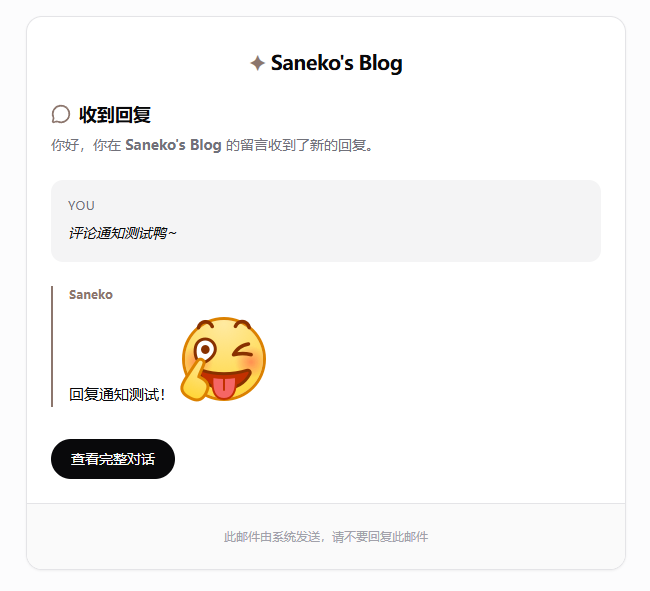
在环境变量中添加 MAIL_TEMPLATE_ADMIN,值为下方 HTML(当有人回复评论时,被回复者将收到此模板邮件)。
<div style="margin: 0; padding: 40px 0; background-color: #fcfcfd; color: #09090b; font-family: Satoshi, ui-sans-serif, system-ui, -apple-system, BlinkMacSystemFont, 'Segoe UI', Roboto, 'Helvetica Neue', Arial, sans-serif;">
    <style>
        /* Dark mode support */
        @media (prefers-color-scheme: dark) {
            .email-body { background-color: #0B0B10 !important; color: #f4f4f5 !important; }
            .card { background-color: #18181b !important; border-color: #27272a !important; }
            .text-muted { color: #a1a1aa !important; }
            .bg-muted { background-color: #27272a !important; }
            .text-primary { color: #8C766D !important; }
        }
    </style>

    <!-- Main Container -->
    <div class="email-body" style="max-width: 600px; margin: 0 auto; padding: 0 20px;">

        <!-- Card -->
        <div class="card" style="background-color: #ffffff; border: 1px solid #e4e4e7; border-radius: 16px; overflow: hidden; box-shadow: 0 1px 2px 0 rgba(0, 0, 0, 0.05);">

            <!-- Brand Header Inside Card -->
            <div style="text-align: center; padding: 32px 0 0 0;">
                <a href="{{site.url}}" style="text-decoration: none; color: #09090b; font-weight: 600; font-size: 20px; letter-spacing: -0.5px;">
                    <span style="color: #8C766D;">✦</span> {{site.name}}
                </a>
            </div>

            <!-- Header -->
            <div style="padding: 24px 24px 0 24px;">
                <h1 style="margin: 0; font-size: 18px; font-weight: 600; color: #09090b; display: flex; align-items: center; gap: 8px;">
                    <!-- MessageCircle Icon -->
                    <img src="https://api.iconify.design/lucide:message-circle.svg?color=%238C766D" width="20" height="20" style="vertical-align: text-bottom;" alt="">
                    <span>收到回复</span>
                </h1>
                <p class="text-muted" style="margin: 8px 0 0 0; font-size: 14px; color: #71717a; line-height: 1.5;">
                    你好,你在 <strong>{{site.name}}</strong> 的留言收到了新的回复。
                </p>
            </div>

            <!-- Content -->
            <div style="padding: 24px;">

                <!-- Quote Block (User's Comment) -->
                <div class="bg-muted" style="background-color: #f4f4f5; border-radius: 12px; padding: 16px; margin-bottom: 24px; border: 1px solid transparent;">
                    <div class="text-muted" style="font-size: 12px; font-weight: 500; color: #71717a; margin-bottom: 8px; text-transform: uppercase; letter-spacing: 0.5px;">You</div>
                    <div style="font-size: 14px; color: #09090b; line-height: 1.6; font-style: italic;">
                        {{parent.comment | safe}}
                    </div>
                </div>

                <!-- Reply Block (Admin's Reply) -->
                <div style="position: relative; padding-left: 16px; border-left: 2px solid #8C766D;">
                    <div style="font-size: 12px; font-weight: 600; color: #8C766D; margin-bottom: 8px;">{{self.nick}}</div>
                    <div style="font-size: 15px; color: #09090b; line-height: 1.6;">
                        {{self.comment | safe}}
                    </div>
                </div>

                <!-- Action Button -->
                <div style="margin-top: 32px;">
                    <a href="{{site.postUrl}}" style="display: inline-block; background-color: #09090b; color: #ffffff; text-decoration: none; padding: 10px 20px; border-radius: 9999px; font-size: 14px; font-weight: 500; transition: opacity 0.2s;">
                        查看完整对话
                    </a>
                </div>

            </div>

            <!-- Footer in Card -->
            <div class="bg-muted" style="background-color: #fafafa; border-top: 1px solid #e4e4e7; padding: 24px; font-size: 12px; color: #a1a1aa; text-align: center;">
                <p style="margin: 0;">此邮件由系统发送,请不要回复此邮件</p>
            </div>

        </div>

    </div>
</div>
添加或修改上述环境变量后,需在 Vercel 中 Redeploy 一次方可生效。
效果预览#
配置完成并重新部署后,新评论与回复将触发如下样式的邮件:
新评论通知(博主收到):
回复通知(被回复者收到):